A language model does not know your company’s internal documents — it was trained on a different set of data. Asking it about an internal policy without providing additional context is like asking a stranger about your company’s rules.
The model may not refuse to answer. Instead, it can generate a plausible-sounding but incorrect response.
Let’s look at what RAG is, how it connects enterprise knowledge to AI, and what it takes to make search across internal documents actually work.
Why the Model Doesn’t Know Your Documents
A large language model acquires its knowledge during training. This is when it learns to work with text, identify patterns, and generate responses. But documents created inside your company yesterday are not part of its training data.
You can try fine-tuning the model on your company’s data. But for most use cases, this is an expensive and complex approach: the model needs to be trained on new data, and its knowledge needs to be kept up to date as things change. Fine-tuning also does not solve the problem of updating information quickly and transparently.
There is another approach: instead of changing the model itself, provide it with the relevant information at the time of the request.
This is where RAG — Retrieval-Augmented Generation comes in. It allows the model to generate a response using additional context retrieved from relevant sources.
RAG first searches the knowledge base for information relevant to the user’s question, then passes the retrieved content to the language model along with the original query. The model generates its response based on this additional context.
That is why RAG is often used as the foundation for AI-powered document search, enterprise knowledge bases, and AI search across internal documents.
How RAG Works: Three Steps
The process can be summarized as follows:
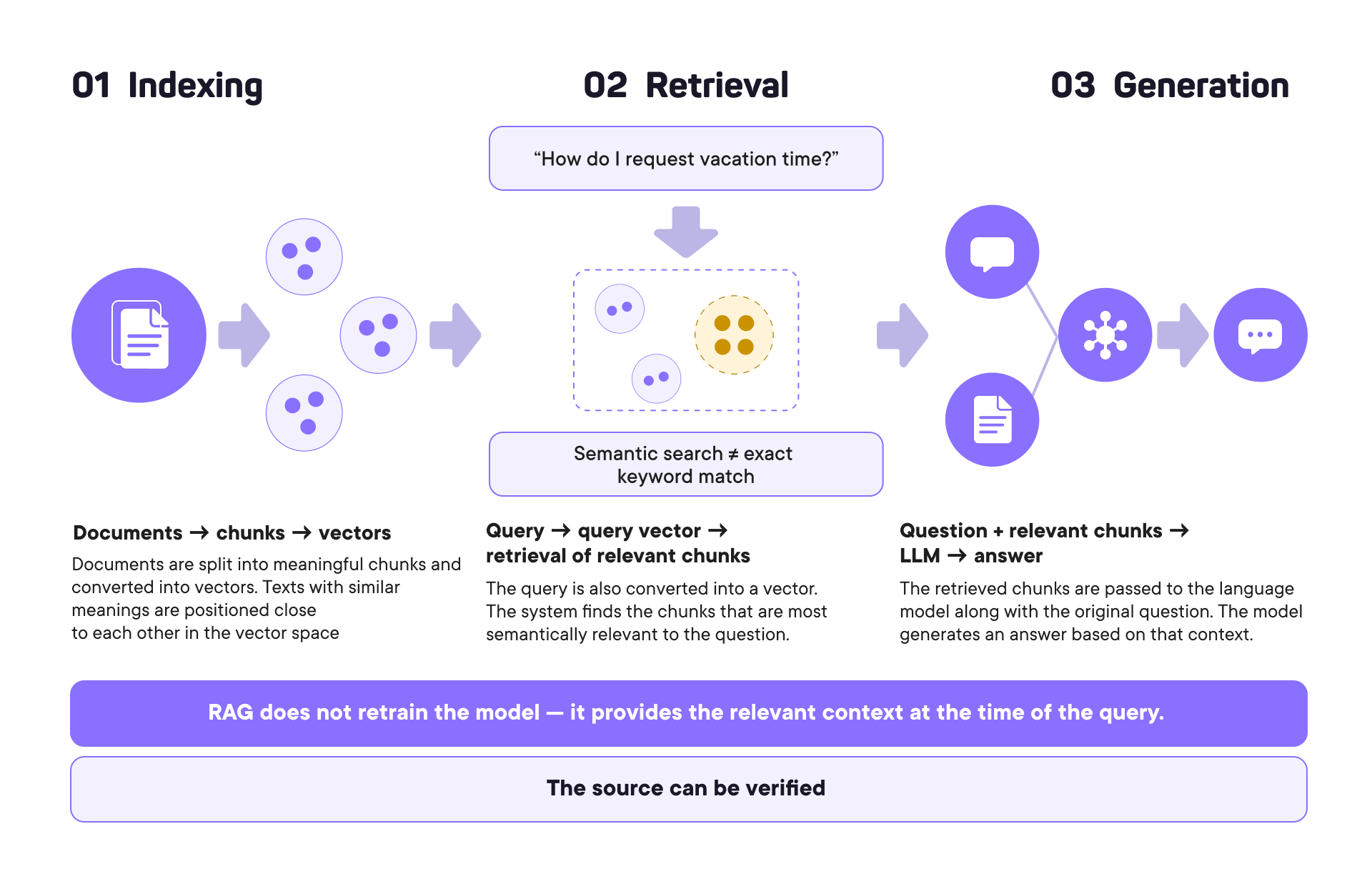
Step 1. Indexing
First, documents need to be prepared for search.
A large document is split into smaller meaningful sections called chunks. Each chunk is then converted by an embedding model into a numerical representation — a vector. You can think of it as a point or arrow in a multidimensional space, where texts with similar meanings are positioned close to each other.
It is important not to simply split a document every 500 or 1,000 characters. Chunk boundaries can be determined by the structure of the text — headings, sections, and sentences. The right strategy depends on the type of documents being indexed.
Step 2. Retrieval
When an employee asks a question, the query is also converted into a vector. The system compares it with the document vectors and retrieves the passages that are most semantically relevant.
This means the user does not have to phrase the question using the exact words found in the document.
For example, a document might refer to a “container for storing water,” while someone asks, “How can I buy a water bottle?” A traditional keyword search may not recognize the connection between these two formulations. Semantic search focuses on their meaning rather than exact word matches.
In practice, the two approaches can be combined: semantic search and traditional keyword search. This type of hybrid retrieval often produces better results.
Step 3. Answer Generation
The retrieved passages are passed to the language model along with the original question.
The model now has additional context: it can use not only the knowledge acquired during training, but also specific information from the company’s internal knowledge base.
It uses this context to generate a clear, human-readable answer.
That is why RAG is not “training ChatGPT on your documents.” It is a mechanism that retrieves relevant information at the time of the query and provides the model with the context it needs to generate an answer.
What Knowledge Engine Adds on Top of Basic RAG
RAG itself solves the task of retrieving relevant information. But in an enterprise environment, the next questions are: what exactly should be retrieved, who should have access to it, and how do you keep the knowledge base up to date?
Knowledge Engine is a Gorgona platform module that manages enterprise knowledge and adds the mechanisms needed to govern it on top of basic RAG.
Access Control
Companies do not have a single knowledge base that every employee should have access to.
A developer may have access to technical documentation, a lawyer to contracts, and an accountant to financial documents. A manager, meanwhile, may have broader access rights.
In Knowledge Engine, documents are organized into a knowledge base → collections → documents structure, with access permissions that can be assigned to teams. Before running a search, the system identifies the user’s team and limits the search to the knowledge bases and collections they have access to.
This is a fundamental difference between enterprise AI search and a basic RAG setup: the model should never receive context from documents that a particular employee is not authorized to access.
At the same time, each customer’s data remains within their own infrastructure. The knowledge base is deployed inside the company’s internal environment rather than becoming a shared database across different organizations.
Knowledge Base Maintenance
Enterprise documents change over time. A policy is updated, an instruction is replaced, or an outdated file is deleted — the system needs to reflect these changes.
Knowledge Engine includes a dedicated Data Steward role responsible for maintaining the knowledge base. This specialist uploads documents, organizes them into collections, configures access permissions, reviews search results, and monitors data quality.
The document ingestion process itself also matters. Gorgona provides built-in connectors for common enterprise systems, including Jira, Confluence, and Google Drive. For non-standard data sources, a custom connector may be required.
Different Document Types
There is no one-size-fits-all RAG configuration.
The chunking strategy, chunk size, embedding model, and information retrieval method may vary depending on the type of data. For example, the structure of Markdown documents can be taken into account during chunking, while another file type may require a different approach.
In Knowledge Engine, these parameters can be configured for each individual knowledge base.
The platform supports common formats, including PDF, DOCX, HTML, and Markdown. Non-standard formats or complex data structures may require additional configuration.
5 RAG Implementation Mistakes That Can Make RAG Fail
RAG is not simply a matter of “connecting your documents.” The quality of the answers depends directly on what data goes into the system and how that data is prepared.
1. Poor Document Chunking
If a chunk cuts off in the middle of a thought, leaves out important context, or combines unrelated parts of a document, retrieval may return a passage that is technically similar to the query but does not actually help answer it.
That is why the chunking strategy should be chosen based on the structure and characteristics of the specific documents.
2. Outdated and Conflicting Data
If the knowledge base contains both the current policy and an outdated draft, the system may retrieve both documents. The model does not automatically know which version the company considers authoritative.
This leads to an important principle: answer quality starts with the quality of your corporate data.
3. Ignoring Access Permissions
If access permissions are not enforced at the retrieval stage, an employee could potentially receive information from a restricted document.
That is why access control should be applied before retrieval, not after the model has already received the context.
4. Lack of Quality Evaluation
A plausible answer is not the same as a correct answer — and “it looks right” is not a quality metric.
One way to evaluate a RAG system is to create a golden set — a collection of questions with known correct answers. The system is then tested against this set, and its responses are compared with the reference answers.
This makes it possible to compare different RAG configurations and see which one performs better on a specific knowledge base.
5. Expecting 100% Accuracy
There is no universal configuration that guarantees the same level of performance across all types of data.
The goal of an AI implementation is not to promise zero errors, but to measure quality, understand the system’s limitations, and quickly identify the causes of performance degradation. Request tracing and analyzing which data was included in the context can help with this.
RAG vs. Fine-Tuning: Which Approach Should You Choose?
If a company needs AI to work with up-to-date internal documents and answer questions based on them, RAG is often the better fit.
The main advantage is that the knowledge base can be updated without retraining the language model. Add a new document, and once it has been processed and indexed, it becomes available as part of the knowledge base.
Fine-tuning solves a different problem. It can make sense when you need to change the model’s behavior, style, or response format. But when it comes to constantly changing corporate information, using model training as a substitute for retrieval from up-to-date documents is generally less practical.
How to Start
For the first pilot, there is no need to move the entire corporate archive into AI at once.
You can start with a single document — for example, a policy, instruction, or knowledge base for a specific department. Then test how well the system retrieves the relevant information, fine-tune the retrieval settings, and only then expand the knowledge base.
In practice, it is important to define in advance:
- which business process AI is expected to improve;
- which documents contain the required knowledge;
- where those documents are currently stored;
- who should have access to them;
- who will be responsible for keeping the knowledge base up to date;
- how answer quality will be evaluated.
This is how RAG moves from a chatbot experiment to a practical business tool.
Knowledge Engine, part of Gorgona, combines enterprise knowledge search, document and knowledge base management, access controls, and tools for evaluating answer quality. The platform itself is deployed within the customer’s infrastructure, allowing companies to work with internal data in a controlled environment.
If you want to see how AI-powered search across your internal documents could work for your company, request a Gorgona demo. During the demo, we can review your data sources, use case, and access requirements and determine which knowledge base would make the most sense for your first pilot.